jan.systems is IPv6 enabled
(2026-09-29)
[note]
Brief timeline:
1996 – Experimental IPv6 support lands in Linux kernel
2012 – World IPv6 Launch Day
2017 – IPv6 is ratified an official Internet Standard
2026 – jan.systems gets IPv6 support (major event)
This website and all other services running under subdomains on my home server are now reachable over IPv6. I also set up autoconfigured IPv6 for my LAN devices for internet access.
IPv6 readiness has been a TODO item for me for a very long time. Earlier attempts have been hindered by:
- my lack of understanding of how IPv6 works, especially Prefix Delegation, and
- nebulous documentation about how my network provider, DNA Finland, supports IPv6.
I have two distinct approaches to IPv6 adoption, one for my home server and one for my router and LAN devices.
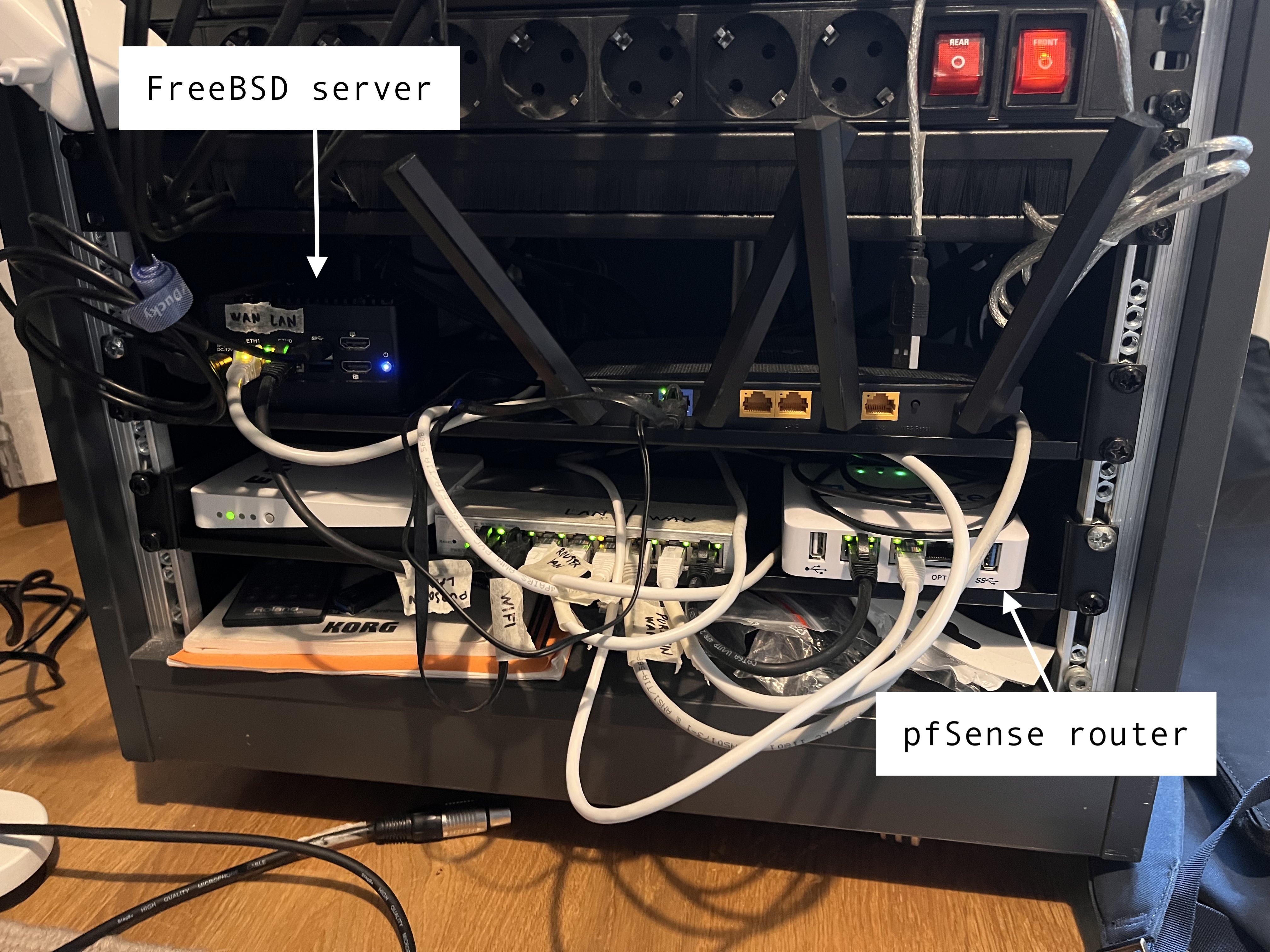
Server: DHCPv6, IA_NA
The server has a physical interface that is directly wired to the wall. The device that's responding on the other end is a DNA Finland router.
First, I tried enabling SLAAC (Stateless Address Auto-Configuration), which is the simpler of the two IPv6 dynamic address assignment mechanisms, the other being DHCPv6. On FreeBSD, SLAAC is enabled on an interface (here: wan0) with:
ifconfig wan0 inet6 accept_rtadv   # accept router advertisements (RA)
ifconfig wan0 inet6 auto_linklocal # auto-configure a link-local address (starts with fe80:)
ifconfig wan0 inet6 -ifdisabled    # disable the "IPv6 disabled" flag
service rtsold onestart            # start the IPv6 router solicitation daemon
The interface immediately got a link-local address, but a globally routable one was nowhere to be seen.
With a bit of tcpdump, I learned that the RA response from the router had the M (managed) flag set. This means that autoconfiguration is not allowed, and hosts must request an address over DHCPv6.
Ok, sure, let's enable DHCPv6 too. The existing interface configuration should stay untouched, since DHCPv6 also needs router advertisements to work. The rtsold service can be stopped though, since router solicitation will be handled by dhcp6c.
service rtsold onestop             # stop the IPv6 router solicitation daemon
pkg install dhcp6                  # install the dhcp6 package, which provides the dhcp6c client
Set up /usr/local/etc/dhcp6c.conf:
interface wan0 {
    send ia-na 0;
    send rapid-commit;
};

id-assoc na 0 {
};
Add these to /etc/rc.conf:
dhcp6c_enable="YES"
dhcp6c_interfaces="wan0"
dhcp6c_conf="/usr/local/etc/dhcp6c.conf"
Here, ia-na stands for Identity Association for Non-temporary Addresses.
It is the term used for single IPv6 address assignments via DHCPv6.
Start the client:
service dhcp6c startEt voilà:
wan0: flags=1008843<UP,BROADCAST,RUNNING,SIMPLEX,MULTICAST,LOWER_UP> metric 0 mtu 1500
        options=60001b<RXCSUM,TXCSUM,VLAN_MTU,VLAN_HWTAGGING,RXCSUM_IPV6,TXCSUM_IPV6>
        ether <redacted>
        inet 87.92.115.230 netmask 0xffffc000 broadcast 87.92.127.255
        inet6 fe80::5a9c:fcff:fe10:b4a0%wan0 prefixlen 64 scopeid 0x37
        inet6 2001:14ba:a306:1576::1 prefixlen 128 pltime 1800 vltime 1800
        groups: epair
        media: Ethernet 10Gbase-T (10Gbase-T <full-duplex>)
        status: active
        nd6 options=23<PERFORMNUD,ACCEPT_RTADV,AUTO_LINKLOCAL>
The 2001: prefixed address is the new, globally routable one.
Router: DHCPv6, IA_PD
The router (pfSense) is also directly plugged into the wall, into a separate socket. The router itself must receive a global address for my inbound Wireguard VPN to work over IPv6, and it must also receive an IPv6 prefix that it then delegates to LAN devices.
IA_PD stands for Identity Association for Prefix Delegation.
I decided that devices in the LAN should use SLAAC to autoconfigure a global address. This means I don't have to run a DHCPv6 server myself at all (nice).
This was actually rather straightforward.
WAN interface setup
In pfSense web interface -> Interfaces -> WAN:
| Setting | Value |
|---|---|
| IPv6 Configuration Type | DHCP6 |
Under DHCP6 Client Configuration on the same page:
| Setting | Value |
|---|---|
| DHCPv6 Prefix Delegation size | 56 |
| Send IPv6 prefix hint | on |
The prefix size /56 is specified by the network provider. I found some documentation from DNA Finland that mentioned 56, so I just went with that.
LAN interface setup
Then, under Interfaces -> LAN:
| Setting | Value |
|---|---|
| IPv6 Configuration Type | Track interface |
And under Track IPv6 Interface on the same page:
| Setting | Value |
|---|---|
| IPv6 interface | WAN |
This will make the LAN interface delegate the prefix that the WAN interface receives from the provider.
Router advertisement
Finally, under Services -> Router Advertisement -> LAN:
| Setting | Value |
|---|---|
| Router Mode | Assisted |
| Enable DNS | on |
The Assisted mode means that it won't set the M (managed) flag, which would indicate DHCPv6. We just want SLAAC. The Assisted mode will provide DNS info as part of the router advertisement.
Firewall
Prefix-delegated addresses will be globally routable, so without a firewall in place, hosts from outside of your network can reach your devices.
The pfSense firewall inbound setup is by default implicit deny, so unless you explicitly permit inbound access, your devices won't be reachable. Return traffic will go through just fine.
With these settings, all my devices in the LAN network got proper IPv6 addresses and gained internet access.
Jails?
Right now, my FreeBSD jails only have static IPv4 addresses, which I define in my Ansible playbook. This means they cannot access the internet over IPv6, nor can they themselves be addressed with modern addresses.
For now, this is fine. All web services are behind an Nginx proxy anyway.
Dynamic DNS
The DHCPv6 leases from DNA Finland should be pretty long, but the prefixes and addresses can still change from time to time.
For that reason, I have a cronjob running on both the server and the router that reads the current public address and updates my DNS zone in Hetzner. This is effectively a manual DynDNS setup via HTTP API.
The script needs an API token which you can generate from the Hetzner Web Console.
The script is available as part of my Ansible repo:
 Jan Sydänviita (né Tuomi)